Simple and Secure Distribution of Your S/MIME Public Key
If you have general questions about S/MIME encryption, you can find more information here.
With S/MIME, you always have two parts of a key pair: the "Public Key" and the "Private Key."
The Public Key is your public encryption key and should be made available to others.
Senders use your public key to encrypt messages specifically for you.
If you use S/MIME but a sender does not know your public key, that person cannot send you encrypted emails.
For this reason, there is a need to improve how your S/MIME public key is managed and distributed.
mail.fr relies on SMIMEA for security reasons
SMIMEA is an approach designed to make key exchange — or more precisely, the publication of your public key — more secure and easier for you (SMIMEA Draft by the IETF).
This allows you to publish the respective public key for your mail.fr email address and any aliases created under your account directly in the DNS of mail.fr.
This procedure ensures that the key published for your mail.fr email address was actually provided by you.
An email client that supports S/MIME can retrieve your public key directly from mail.fr via a DNS request and verify the data source using DNSSEC.
Using SMIMEA ensures that only mail.fr, as the owner of its DNS infrastructure, can publish S/MIME keys for your mail.fr address within this system.
Another advantage is that as a mail.fr customer, you can delete or replace your public key(s) at any time.
Publish your public key in the mail.fr DNS in just a few steps:
-
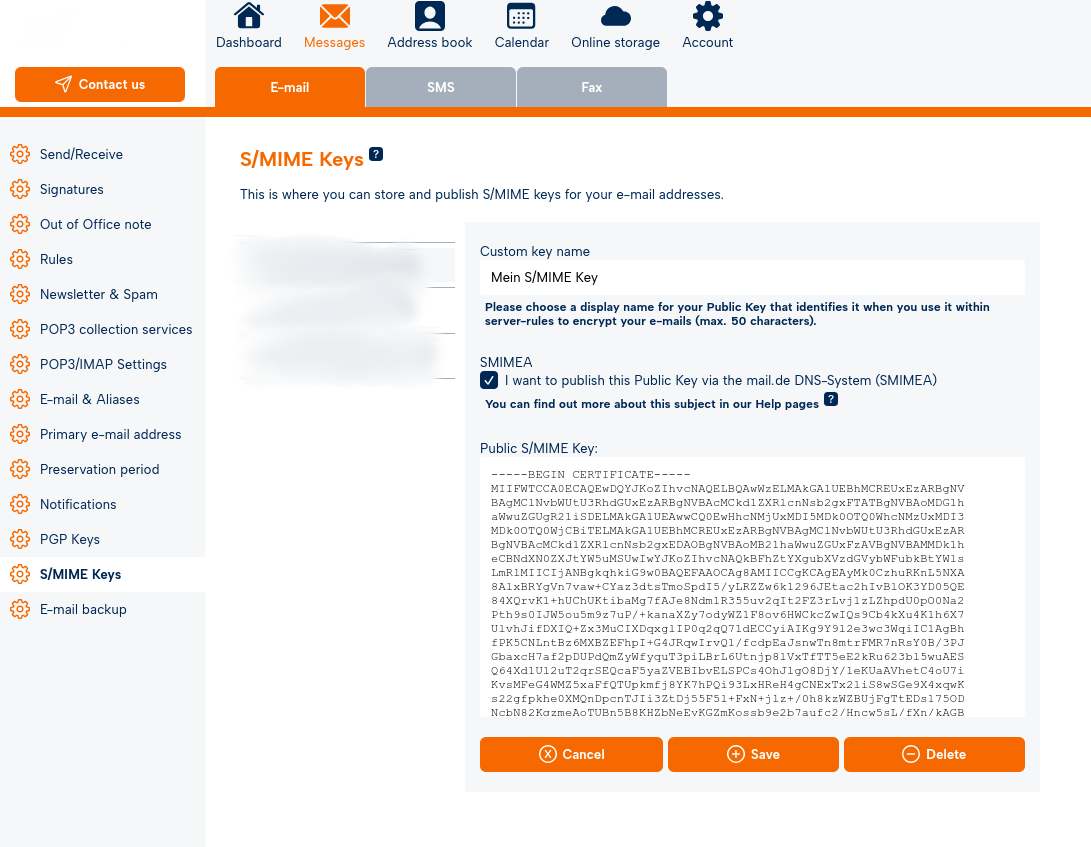
Log in to the mail.fr webmailer and navigate to the settings.
-
Under "Messages/E-Mail", click *"S/MIME Keys"** in the left-hand menu.
-
All email addresses configured for your account will be listed there.
-
Click the desired mail.fr email address or alias.
-
If no public key has been assigned to the selected email address yet, click "New."
If a key already exists, click "Edit (pencil icon)." -
Check the box:
"Publish this public key in the mail.fr DNS via SMIMEA." -
Click "Save."
Important note:
If you want to remove a public key from the mail.fr DNS, simply uncheck the box and click "Save."
If you delete your public key, it will automatically be removed from the mail.fr DNS.
To replace an old public key with a new one, remove the old key, paste the new key into the text field, and click "Save."

